
Waitlist
Never lose a booking to a cancellation again.
Allow customers to join a waiting list when no time slots are available. Automatically notify them when a spot opens up.
Opens a real workspace with sample data — no signup, nothing to install.
Where it appears
A dedicated Waitlist section appears in the main sidebar. Staff can add entries, view pending requests, and manually notify customers.
What your customers see
When a time slot opens (e.g. due to a cancellation), the next customer on the waitlist receives an email with an offer to book the freed slot.
Why it matters
Reduce lost bookings from cancellations. Fill open slots faster and keep customers engaged instead of losing them when no times are available.
How it works
You keep a list of who's waiting
When someone wants a time you can't offer, add them to the waiting list with the service they want, optionally a specific team member, and the date and time window that would suit them. The list lives in your sidebar, split into who's still active and who's already been dealt with.
A cancellation triggers the offer automatically
The moment a booking is cancelled, the freed slot is offered to the person who has been waiting longest for that same service. You don't have to notice the gap or chase anyone — it happens on its own.
They get three hours to take it
The offer email links to a page showing the exact slot, team member and price, with a live countdown. If they don't confirm within three hours, the offer lapses and the slot goes to the next person waiting, so a held slot never quietly blocks your calendar.
Confirming books them straight in
One tap on that page turns the offer into a real booking in your calendar — no phone call, no back-and-forth, and no risk of you double-booking the slot in the meantime.
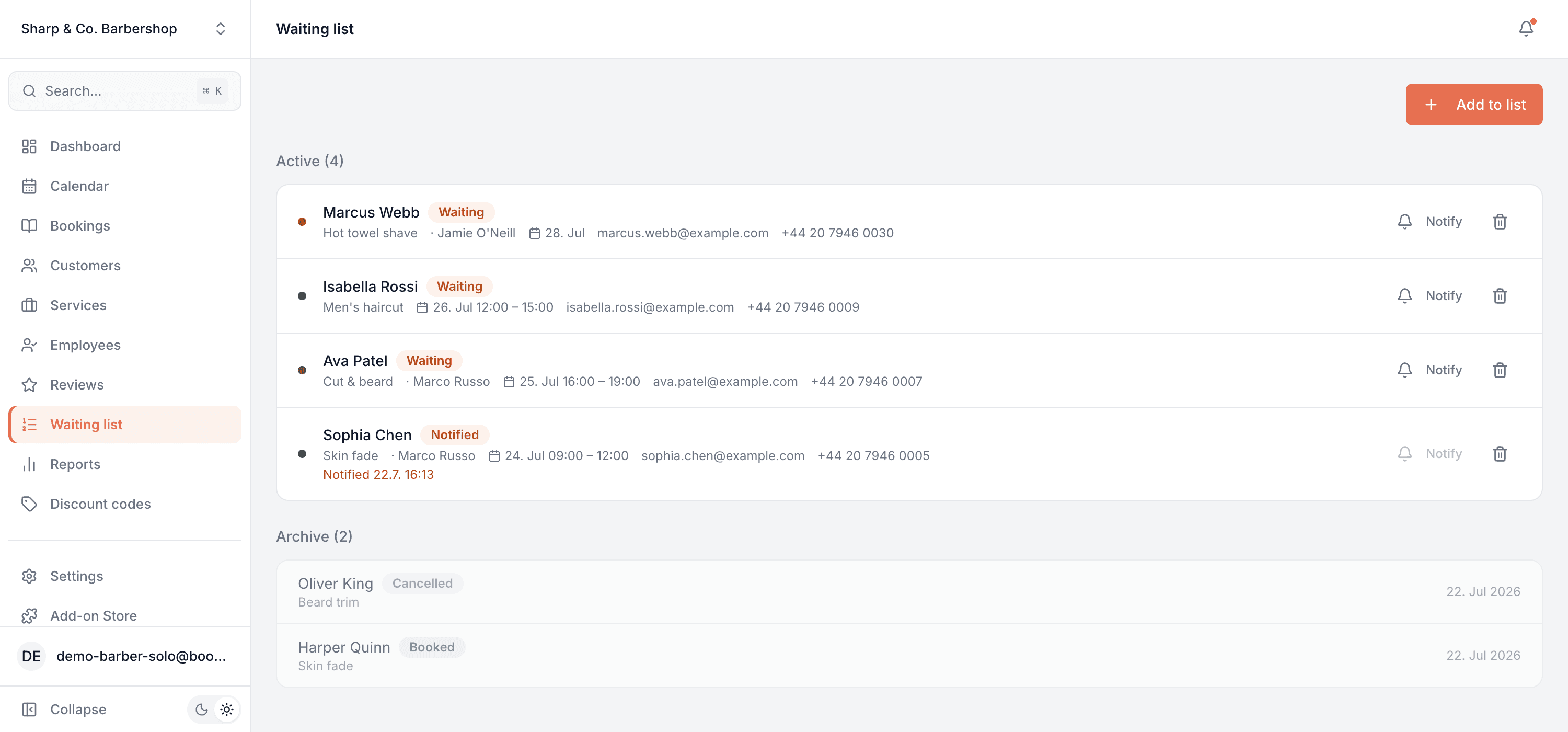
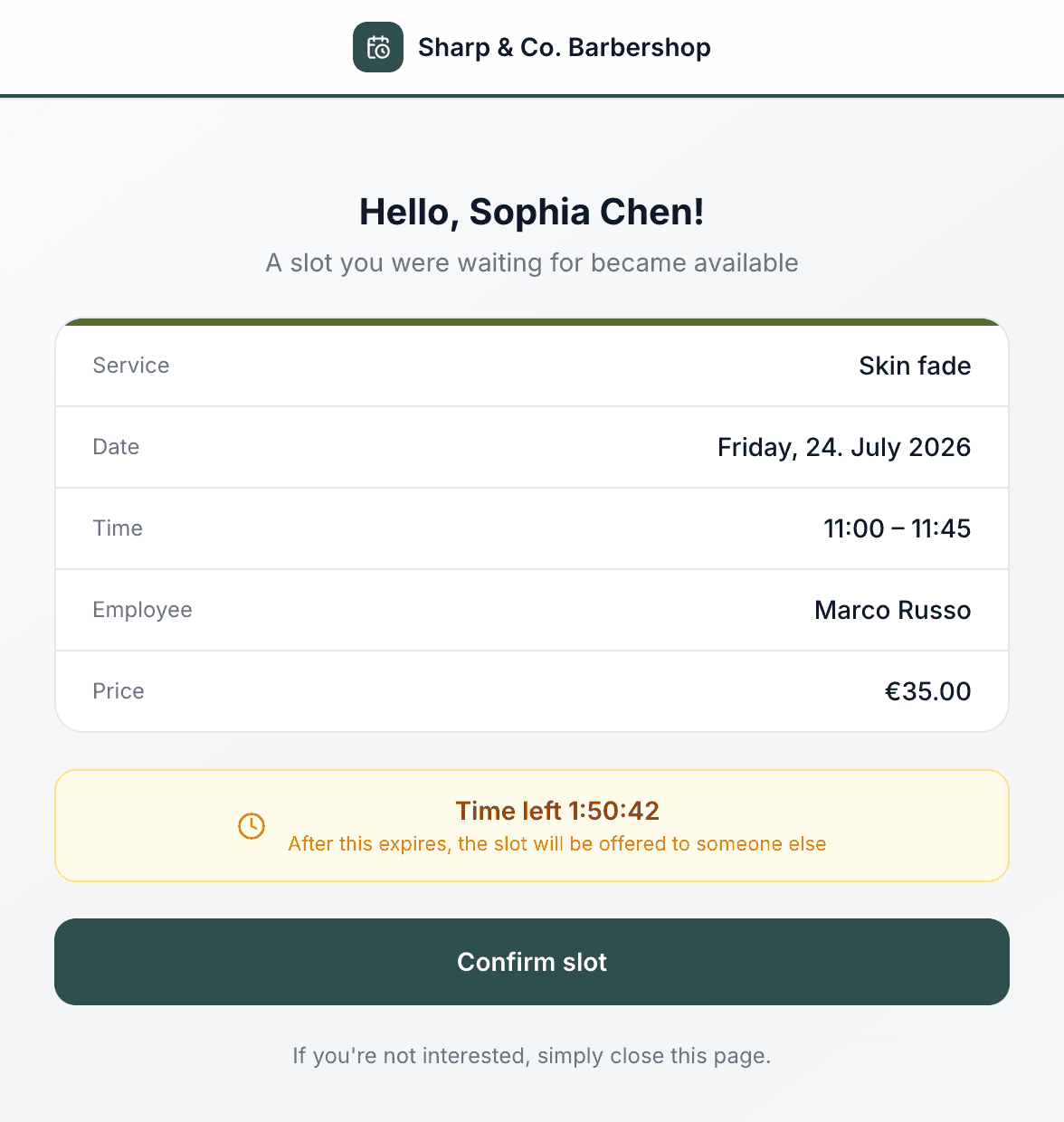
This is real sample data you can click through yourself.
Made for your business
However you take bookings, here's what it looks like for you.
Barbershop
A regular cancels their Saturday skin fade an hour before. The next person waiting for a skin fade is offered it automatically, and the chair stays full.
Nail & beauty studio
Your gel manicure slots are booked out three weeks ahead. Instead of turning people away, you add them to the list and let the cancellations find them.
Gym & studio
A member drops out of a full personal-training slot. The longest-waiting member gets first refusal before anyone else hears the slot is free.
Photo studio
A wedding shoot falls through. Rather than lose the day, the couple who asked about that weekend get offered it before you re-advertise.
Common questions
- How does someone get onto the waiting list?
- You add them from the Waiting list screen — name, contact details, the service they want, optionally a specific team member, and the date and time window that suits them. It's a tool for your team rather than a form on your booking page, so you stay in control of who goes on the list.
- Who gets offered a slot when a booking is cancelled?
- The person who has been waiting longest for that same service. Matching on the service means a cancelled beard trim isn't offered to someone holding out for a full colour treatment.
- How long do they have to respond?
- Three hours, or until the slot starts if that comes first. The offer page shows a live countdown, and once it runs out the slot is offered to the next person waiting for that service, as long as it's still free. Nothing sits blocked waiting on a reply that never comes.
- Can I offer a slot to someone myself?
- Yes. Every active entry has a Notify button, so you can send an offer to whoever you choose without waiting for a cancellation to trigger it.
- What does the customer need to do?
- Open the link in the email and tap once to confirm. There's no account to create and nothing to install — the page works for a logged-out visitor and books them straight into your calendar.
- Will it email people while I've paused notifications?
- No. If notifications are paused for your business, no waitlist offers go out, and turning the add-on off stops them entirely.
Ready to try Waitlist?
It's included in Bookodile — turn it on in a click, no setup required.