
Discount Codes
Drive bookings with targeted promo codes.
Create and manage discount codes that customers can apply during booking. Supports percentage and fixed-amount discounts with usage limits.
Opens a real workspace with sample data — no signup, nothing to install.
Where it appears
A dedicated Discount Codes section appears in the main sidebar. On the public booking page, customers see a discount code input field at checkout.
What your customers see
Customers enter a discount code during the booking process and see the discounted price before confirming. Codes can have expiry dates and maximum usage limits.
Why it matters
Drive bookings with promotions. Attract new customers, reward loyal ones, and fill slower time periods with targeted offers.
How it works
Create a code in about ten seconds
Type the code, pick whether it takes a percentage or a flat amount off, and you're done. Optionally cap how many times it can be used and give it an end date — leave both blank and it just runs.
Share it wherever you like
There's nothing to configure per channel. Put the same code in an Instagram post, a flyer, a partner's newsletter or a reply to a regular — anyone who types it into your booking page gets the discount.
Customers apply it while they book
The code box sits on the details step of your booking page. They type it, tap Apply, and immediately see what it saved them — the old total struck through and the new one beside it. No account needed.
Limits look after themselves
Every use is counted. Once a code hits its cap or passes its end date it stops working on its own, and the list marks it Exhausted or Expired so you can see at a glance what's still live.
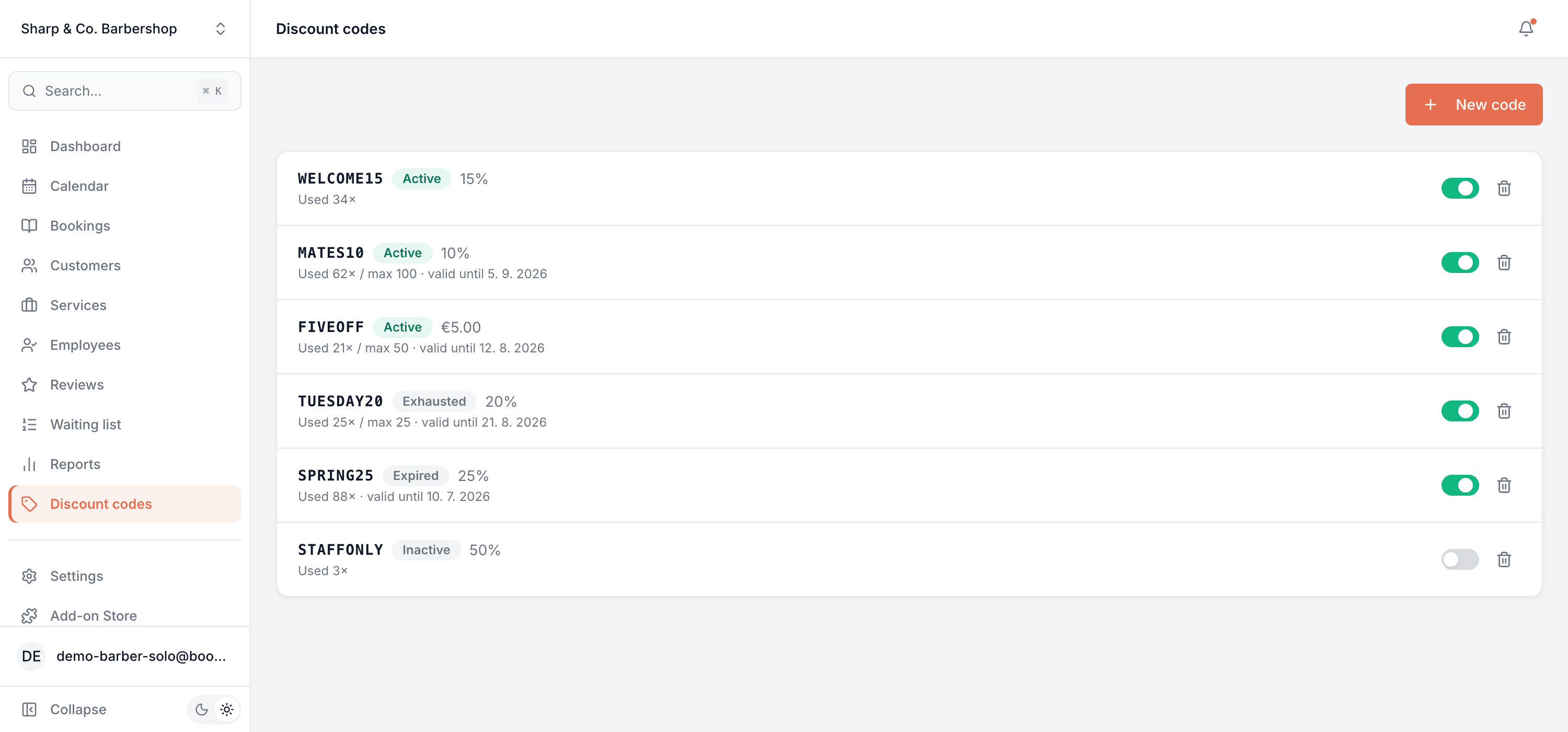
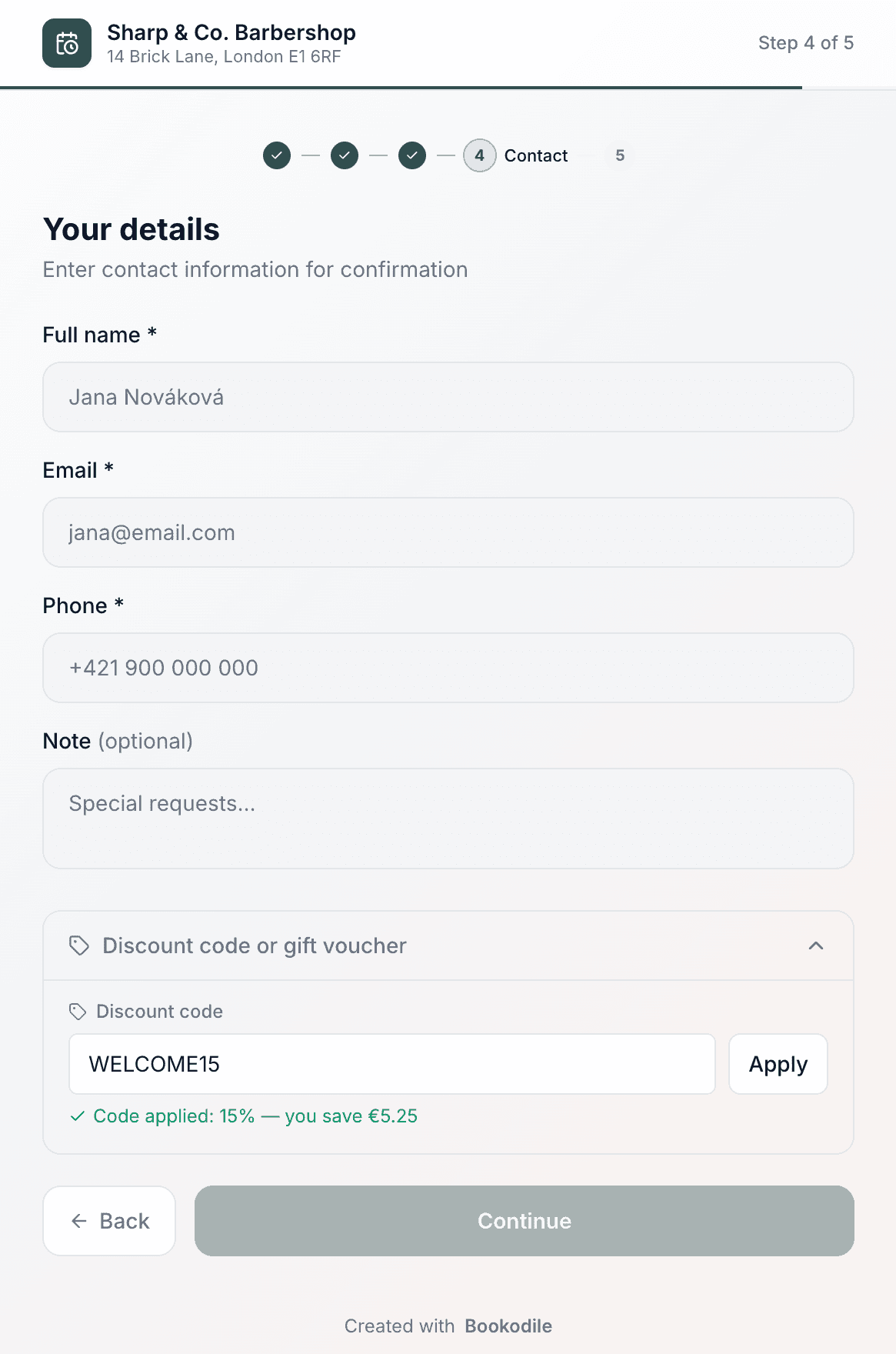
This is real sample data you can click through yourself.
Made for your business
However you take bookings, here's what it looks like for you.
Barbershop
Print a WELCOME15 code on a card and hand it to everyone who walks past on opening week — then see exactly how many turned into bookings.
Nail & beauty studio
Give a 20% code to a local influencer, cap it at 50 uses, and let it switch itself off when the run is done.
Gym & studio
Run a flat €10 off January intro sessions with an end date, so the offer can't quietly outlive the campaign.
Photo studio
Send returning clients a code after their gallery is delivered, to nudge next year's shoot while they're still delighted.
Common questions
- Percentage or a fixed amount?
- Either. A percentage comes off the service price, a fixed amount takes a set sum off. Both are capped at the price of the service, so a code can never take a booking below zero.
- Can I limit how many times a code is used?
- Yes — set a maximum number of uses, an end date, or both. Leave them blank for a code that runs until you switch it off. Uses are counted as they happen, so the cap is never overshot even if two people book at the same moment.
- Can I restrict a code to certain services?
- Not at the moment. A code applies to whichever service the customer books, across your whole business. If you want to push specific services instead, Promotions is the tool for that — it features chosen services for a date range.
- Does the discount apply to add-ons too?
- No. It comes off the main service being booked; any extras the customer adds are charged in full.
- Can a customer use a code and a gift voucher together?
- Yes. The discount code is applied first, then the voucher balance comes off what's left.
- Do customers need an account?
- No. They type the code on your booking page and see the new total straight away — no signup, nothing to install.
Ready to try Discount Codes?
It's included in Bookodile — turn it on in a click, no setup required.