
Upsell Service Discounts
Reward clients for adding extras at checkout.
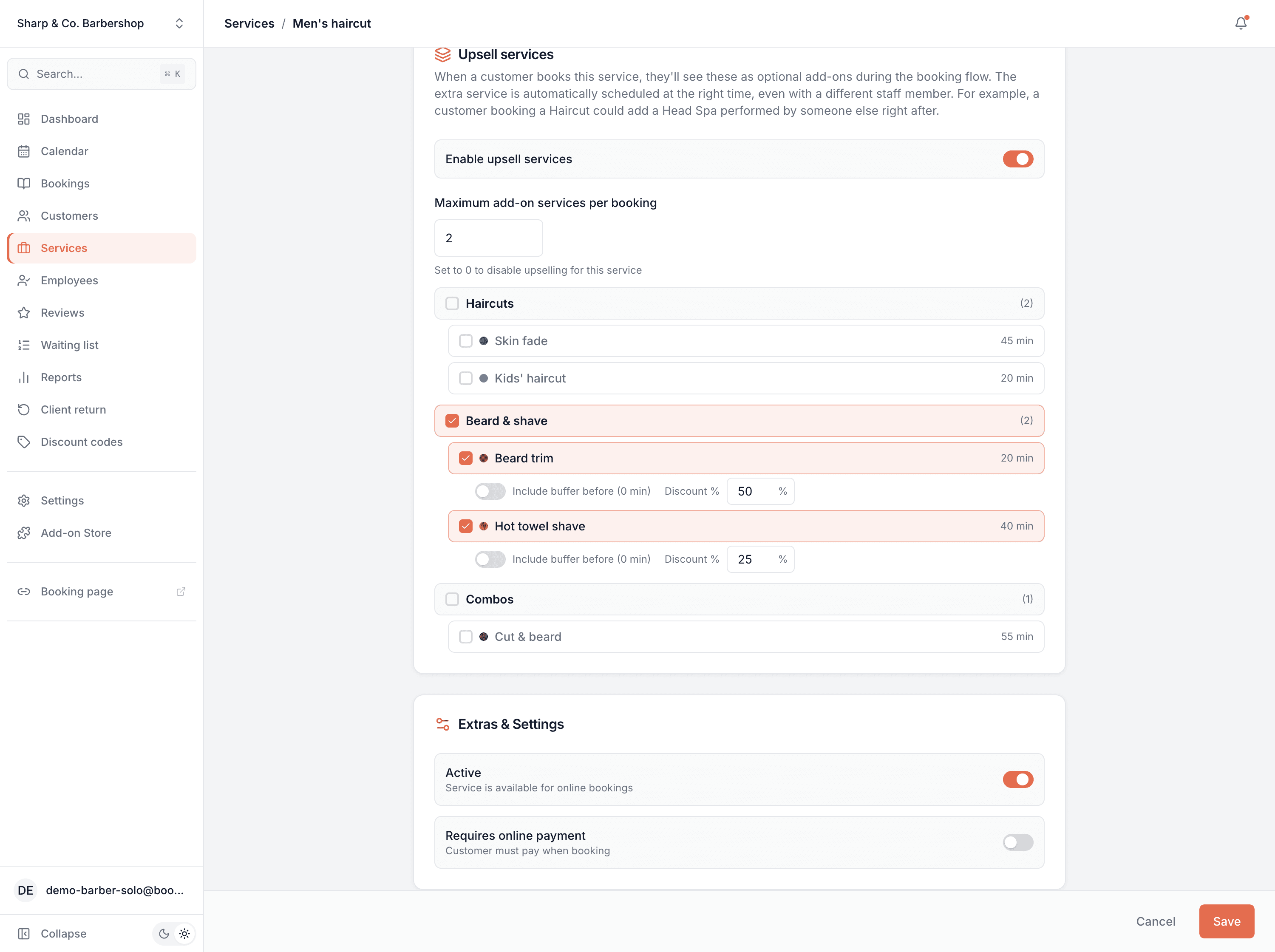
Offer percentage discounts on services suggested as upsells during booking. Set a default discount per category pair (e.g. Hair → Massage 15% off) or override it for specific service pairings.
Opens a real workspace with sample data — no signup, nothing to install.
Where it appears
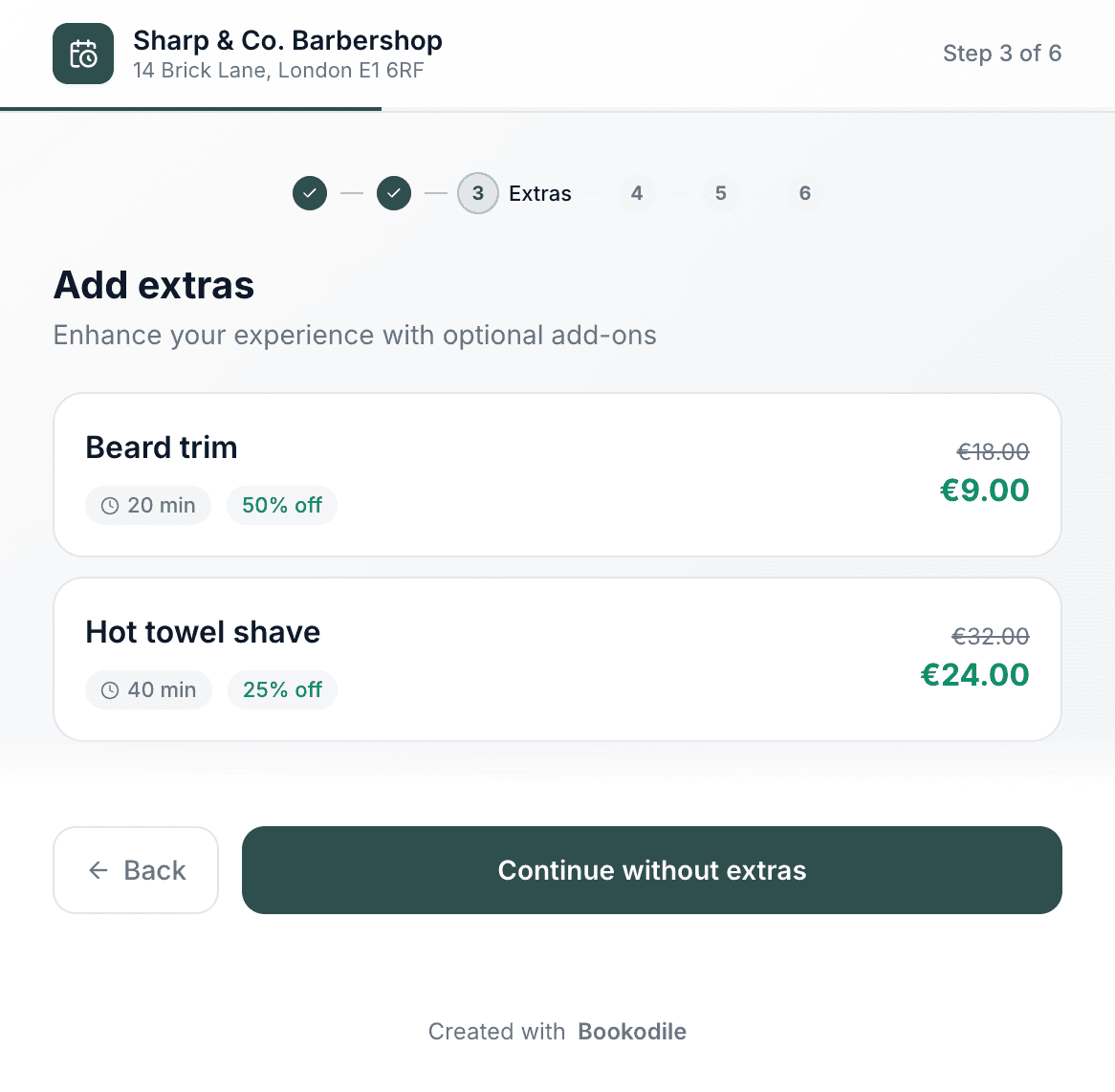
Configure discounts inside each Service or Service Category form (next to upsell selection). Customers see the discount as a green '20% off' badge with a strike-through original price on the upsell card during booking.
What your customers see
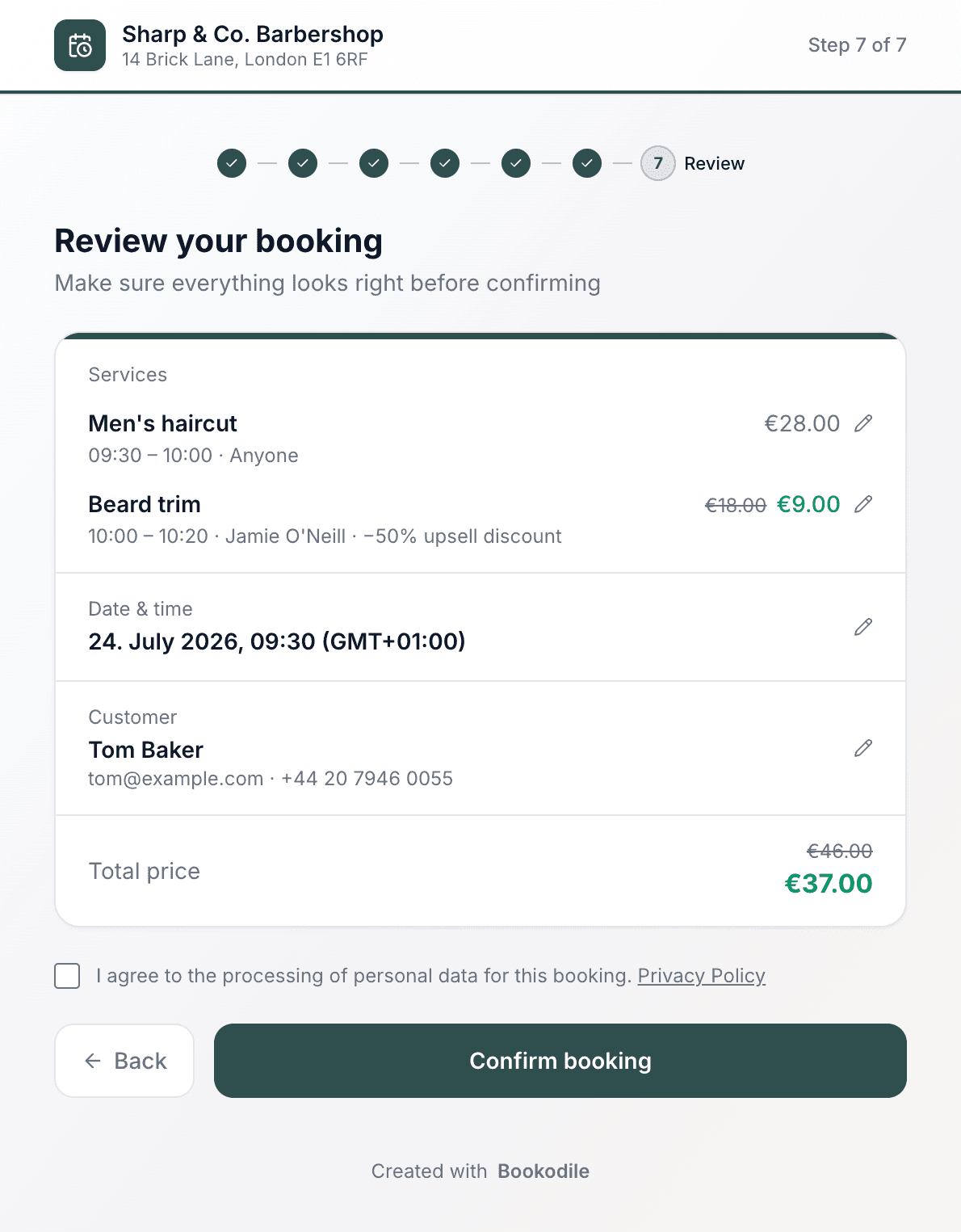
When choosing optional extras during the booking flow, customers see the original price crossed out, the new discounted price, and a clearly labeled discount badge. The reduced price is also shown on the confirmation screen, the confirmation email, and the booking management page.
Why it matters
Boost upsell uptake with transparent, time-of-booking promotions. Discounts apply only to the upsell service — never the primary one — so the headline price stays intact while you reward customers for adding extras.
How it works
Pair a discount with an add-on
On any service, choose which other services can be added on to it, and give each one a discount — say a beard trim at half price when it's booked with a haircut. It's a standing offer, not a dated promotion: no code, no start and end date, it's just always there.
The customer sees the deal while booking
When they book the main service, the add-ons appear with the discount already shown — a green “50% off” badge, the full price struck through and the lower price beside it. Nothing to type, and the extra is scheduled in automatically, even if a different team member performs it.
Only the extra is discounted
The discount comes off the add-on, never the main service. So a haircut stays full price and the beard trim added alongside it is the part that's reduced — exactly the nudge that gets a bigger booking without giving away the core service.
The lower price carries all the way through
The reduced add-on price shows on the booking summary, the total, the confirmation email and the manage-booking page. What the customer's quoted is what they pay.
This is real sample data you can click through yourself.
Made for your business
However you take bookings, here's what it looks like for you.
Barbershop
Offer a beard trim at half price with any haircut — the kind of extra people say yes to when it's right there and clearly cheaper.
Nail & beauty studio
Discount nail art when it's added to a gel manicure, and watch the average booking value climb without discounting the manicure itself.
Gym & studio
Pair a recovery or mobility add-on with a PT session at a reduced rate, so members build the habit of booking both.
Photo studio
Add discounted extra prints or a second look to a portrait session, priced to feel like an easy yes at checkout.
Common questions
- Does the discount come off the whole booking?
- No — only the added-on service. The main service the customer books stays at full price; the extra they add alongside it is what's discounted. That's the point: it rewards them for booking more, without cutting into your core service.
- Do customers need a code?
- No. The discount is shown and applied automatically the moment they add the extra during booking. There's nothing to type and no account needed.
- How is this different from Promotions?
- Upsell discounts are always on — a standing “add this for less” offer with no dates. Promotions run for a set date range and can also feature whole services on your booking page. If you want a time-limited push, that's Promotions; if you want a permanent add-on deal, this is it.
- Can I set a different discount per add-on?
- Yes. Each add-on on a service carries its own discount, and you can set a default for a whole category and override it on individual services.
- Where does the customer see the discounted price?
- On the add-ons step, the booking summary, the total, the confirmation email and the manage-booking page — everywhere the price appears.
Ready to try Upsell Service Discounts?
It's included in Bookodile — turn it on in a click, no setup required.