
Campaign Tracking
See which ads actually bring bookings.
Track which ads and channels bring customers to your booking page. See which campaigns convert the best.
Opens a real workspace with sample data — no signup, nothing to install.
Where it appears
Works silently on your booking page. No visible changes to the booking flow. Data appears in this settings page once enabled.
Who it's for
No change for your customers. They won't notice anything different. The tracking happens automatically in the background.
Why it matters
See which ads bring the most bookings. Stop wasting money on campaigns that don't work. Compare Google, Instagram, Facebook, and other channels side by side.
How it works
Tag your links
For each place you advertise — Google, Instagram, Facebook, a flyer — use a version of your booking link with a source tag on the end. The setup screen builds these for you, ready to copy, so you don't have to know the syntax.
Bookings remember where they came from
When someone books after clicking a tagged link, the source is quietly recorded against that booking. Your customers see nothing different — it's invisible to them and needs no cookie banner or extra step.
The report shows what's working
See your bookings from the last 30 days broken down by source, each with a share of the total, and by campaign. The channel bringing you the most bookings is obvious at a glance.
Spend where it pays back
Instead of guessing which ad is worth it, you can see that (say) Instagram brought twice the bookings of Facebook this month — and put your money and time where the bookings actually come from.
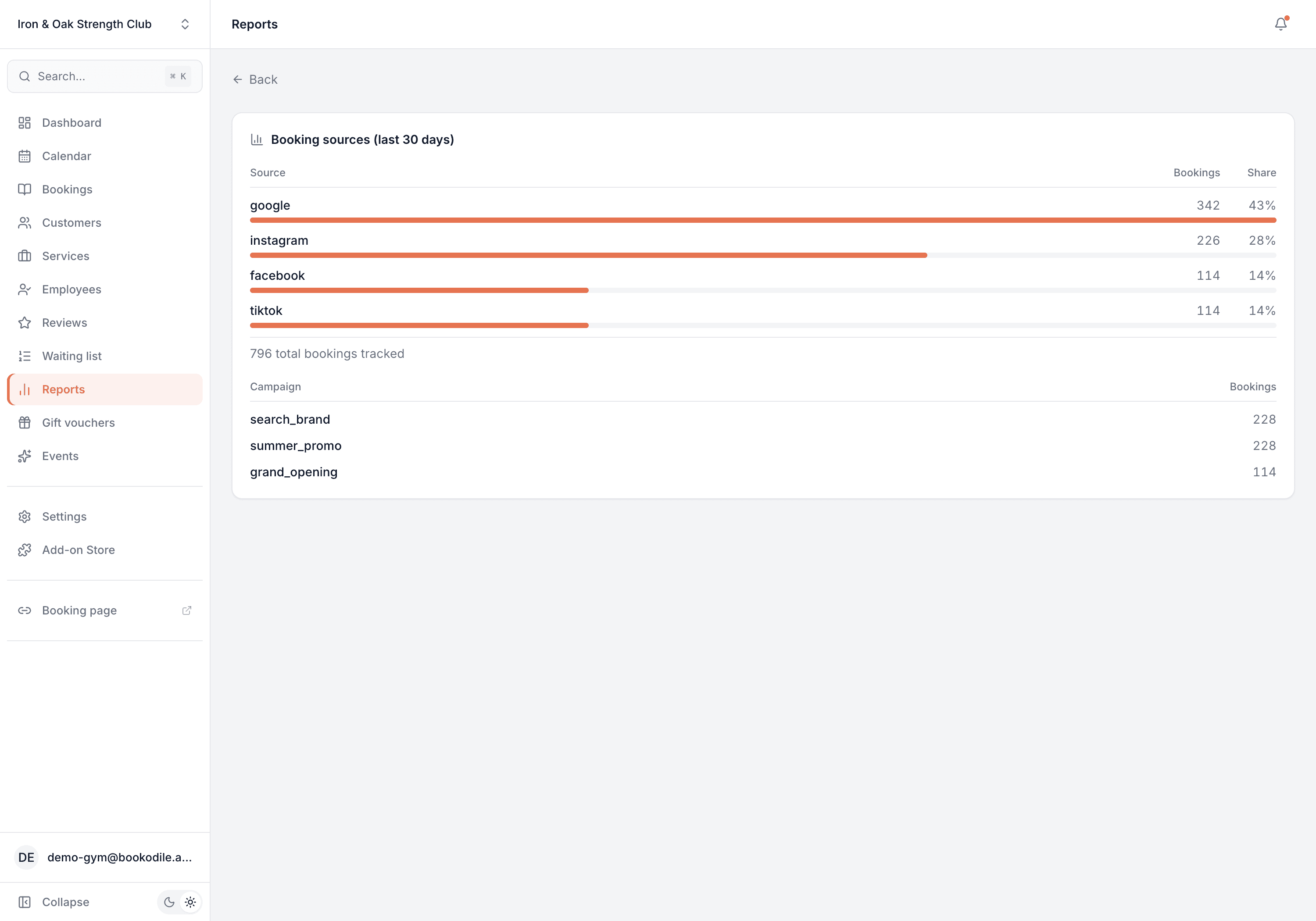
This is real sample data you can click through yourself.
Made for your business
However you take bookings, here's what it looks like for you.
Barbershop
Find out whether the Instagram posts or the Google ads are actually filling the chairs, and drop the one that isn't.
Nail & beauty studio
Tag a flyer campaign and a paid-social push separately, and see which one new clients really came from.
Gym & studio
Compare a New-Year ad campaign against organic word-of-mouth and know what the ad spend bought you.
Photo studio
See whether a wedding-fair link or a paid search brought the enquiries, and plan next season's marketing around it.
Common questions
- How do I tag a link?
- The setup screen gives you ready-made versions of your booking link for Google, Instagram, Facebook and TikTok — copy the one you need and use it in that ad or post. You can add your own campaign name to tell specific pushes apart.
- Does this track revenue per channel?
- Not at the moment. The report counts bookings by source and campaign — how many each brought in and its share of the total. It's about volume and where it comes from, not per-channel revenue.
- Do my customers notice anything?
- No. The source is captured silently from the link they clicked. There's nothing extra for them to do and nothing different to see.
- How far back does the report look?
- The last 30 days of bookings that carry a source tag.
- Do I need to set up analytics or add a tracking script?
- No. It's built in — tag your links and the bookings are attributed automatically, with no third-party analytics to wire up.
Ready to try Campaign Tracking?
It's included in Bookodile — turn it on in a click, no setup required.