
Employees & permissions
Your team, with exactly the access each person needs.
Add your team, choose which services each person offers and set their working hours — then give each role exactly the access it needs.
Part of every plan — nothing to switch on.
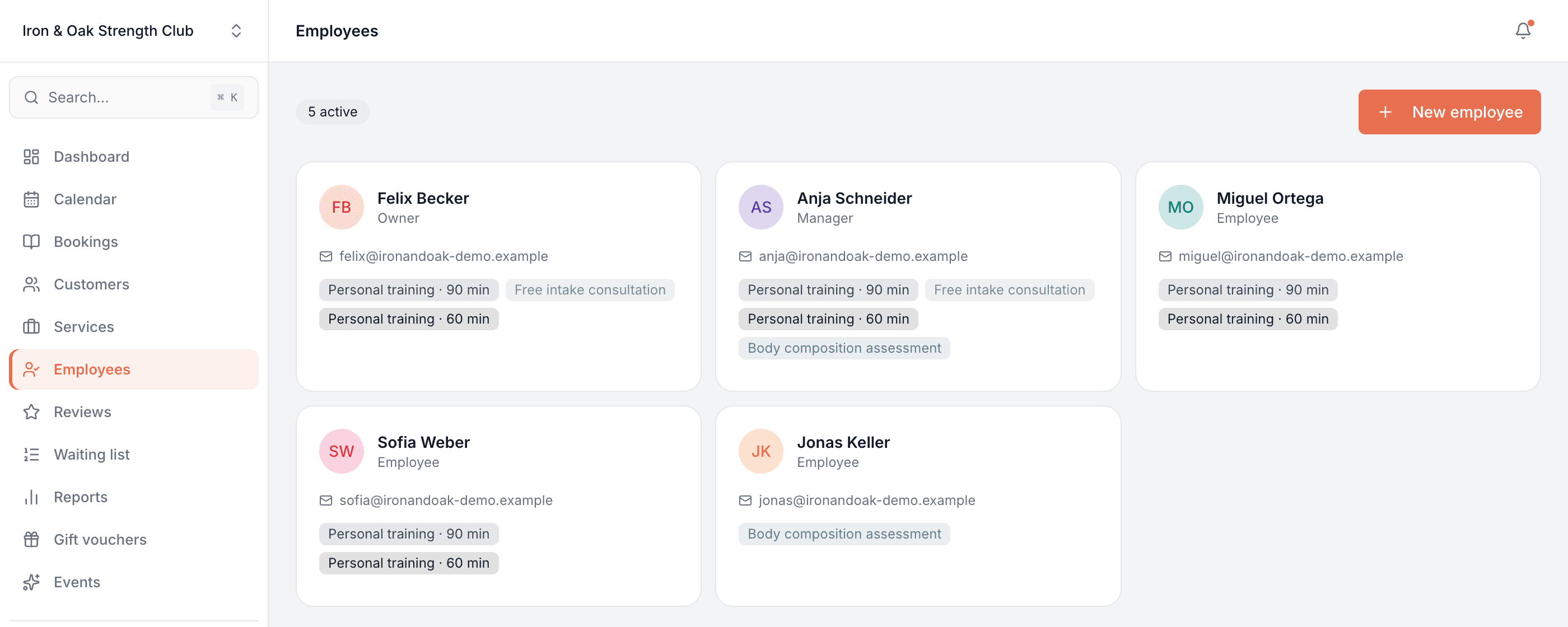
Your whole team
Add everyone who takes bookings. Each person gets a profile, their own colour and their own column on the calendar.
Who offers what
Assign each person only the services they actually perform, so a customer can never book someone for the wrong thing.
Individual working hours
Every team member keeps their own weekly hours and days off — the times offered on your booking page follow them exactly.
Roles & permissions
Owner, Manager, Employee and Receptionist are ready to go — or build your own role and set every permission by hand.
See only what's theirs
Scope a role to its own bookings and customers, or open it up to the whole business — down to individual toggles.
Not everyone is bookable
A receptionist or admin can run the diary and take bookings for others without ever appearing as someone customers can book.
One profile per person
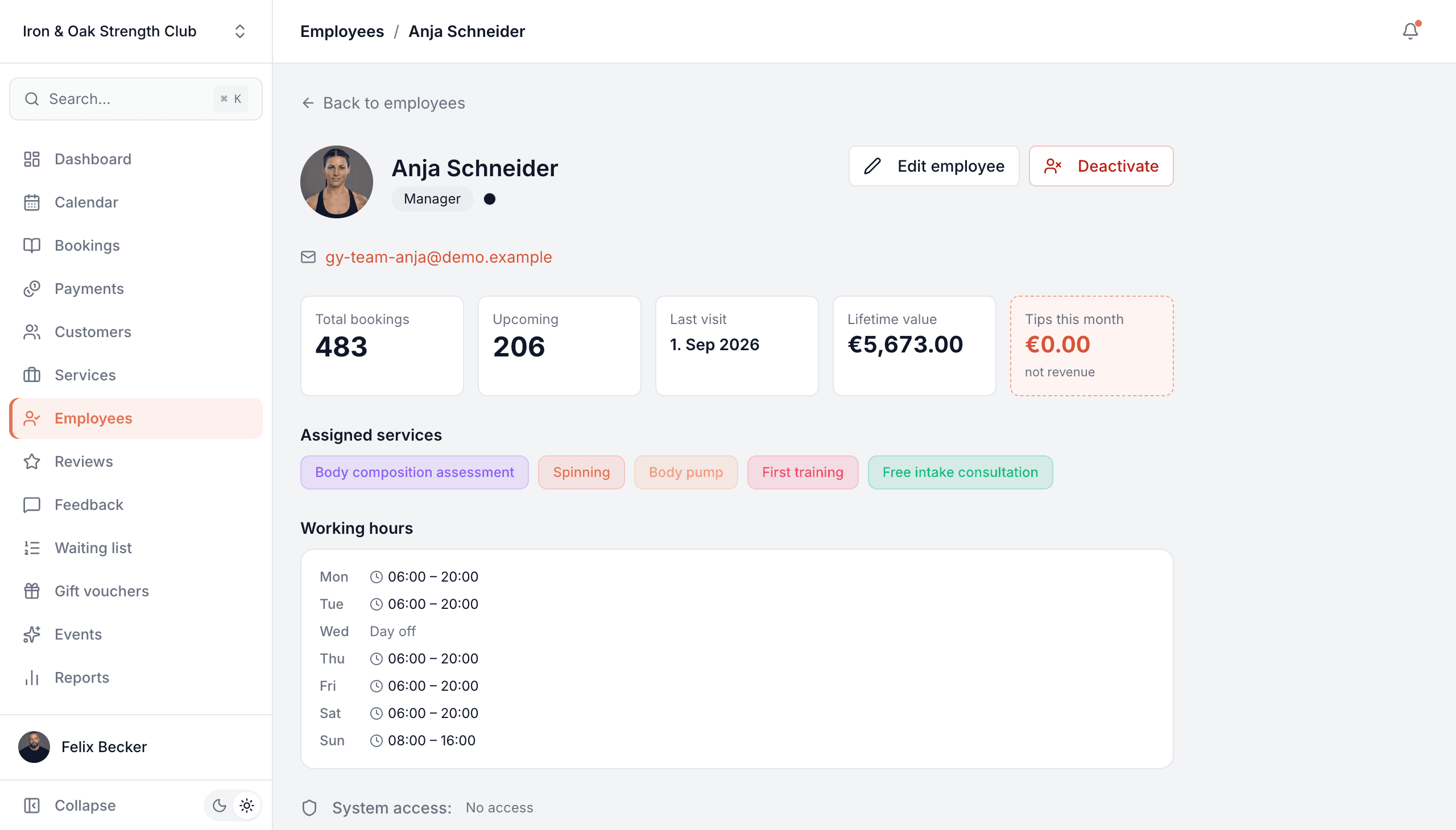
Open any team member and their whole working picture is on a single screen — how many bookings they've taken, what's coming up, when they last worked and the revenue they've brought in — above the exact services they offer and the hours they keep.
- Total bookings, upcoming count, last visit and lifetime value up top
- The services this person is assigned — the only ones a customer can book them for
- A full weekly schedule with days off, and their upcoming appointments
Roles that fit how you actually run the place
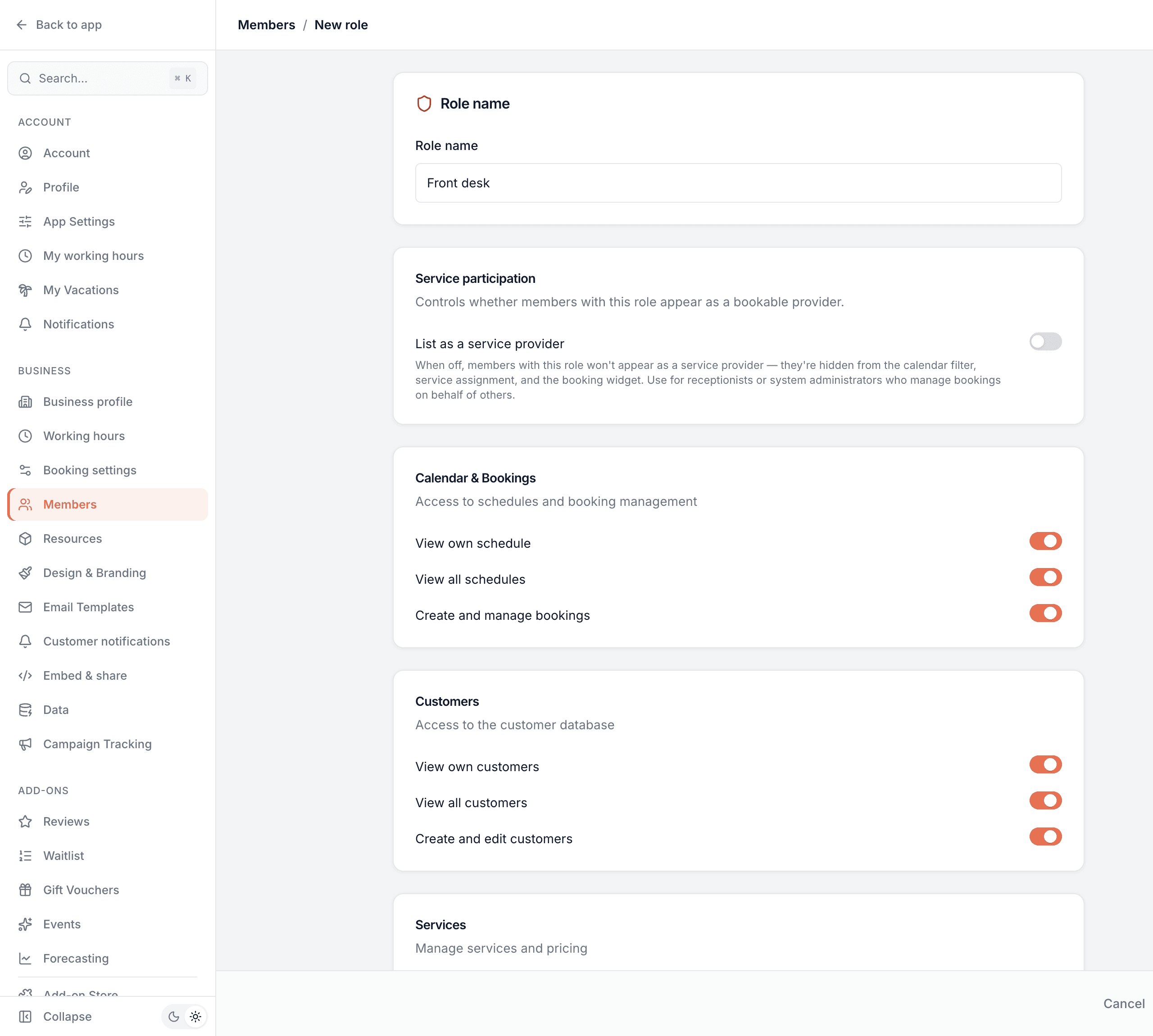
Four roles are ready from day one — Owner, Manager, Employee and Receptionist — and you can add your own. Every role is just a set of switches, so you decide exactly what each person can see and do, from the whole business down to only their own work.
- Toggle access to bookings, customers, services, the team, reports and settings — each on its own
- Give a role its own bookings and customers only, or all of them across the business
- Switch "list as a service provider" off for front-desk or admin roles who manage bookings for others
Working on your own? Then none of this is in your way
Tell Bookodile it's just you and the whole idea of staff steps aside. Your customers pick a service and a time — they're never asked which person they want, because there's only one answer. Your calendar is a single readable column instead of an empty grid, and your working hours are your opening hours, set once. Nothing is deleted and nothing is locked: add someone the day you hire them and every screen comes back.
- Your booking page drops the “who would you like?” step — one less thing for a customer to think about
- Your own working hours double as the shop's opening hours, so the two can never disagree
- Change your mind whenever you like — it's one setting under Members, and switching back takes a click
Common questions
- How do I control what my team can see?
- Through roles. Every team member has a role, and each role is a set of permissions you toggle — bookings, customers, services, the team, reports and settings — either for their own work only or across the whole business.
- What roles do I get out of the box?
- Owner, Manager, Employee and Receptionist. Use them as they are, or create your own role and set every permission by hand.
- Can someone manage bookings without being bookable themselves?
- Yes. Turn off "list as a service provider" for that role and the person runs the diary and takes bookings for others, but never shows up as someone customers can book — ideal for a receptionist or an owner who doesn't take appointments.
- Can each person have their own working hours?
- Yes. Every team member keeps their own weekly hours and days off, and your booking page only ever offers times they're actually available.
- Can I limit which services a person offers?
- Yes. Each team member is assigned the specific services they perform, so customers can only book them for those.
- Can I remove someone without losing their history?
- Yes. Deactivate a team member and their past bookings and records stay intact — they simply stop taking new appointments.
- What if I work on my own?
- Then you can put the whole team side of Bookodile away. Choose “Just me” under Settings → Members and the Employees screens, the per-person pricing and the staff filters disappear, your customers stop being asked which person they want, and your working hours become your opening hours. Nothing is deleted — add someone later and it all comes back.
Employees & permissions is in every Bookodile account
Along with everything else you need to take bookings — nothing to switch on, no add-on required.